
织梦DedeCMS栏目添加英文名称、栏目大图、栏目小图功能教程
本教程详细介绍如何为织梦DedeCMS栏目添加英文名称、栏目大图及栏目小图功能,包含数据库字段添加、文件修改、模板调用等完整步骤。
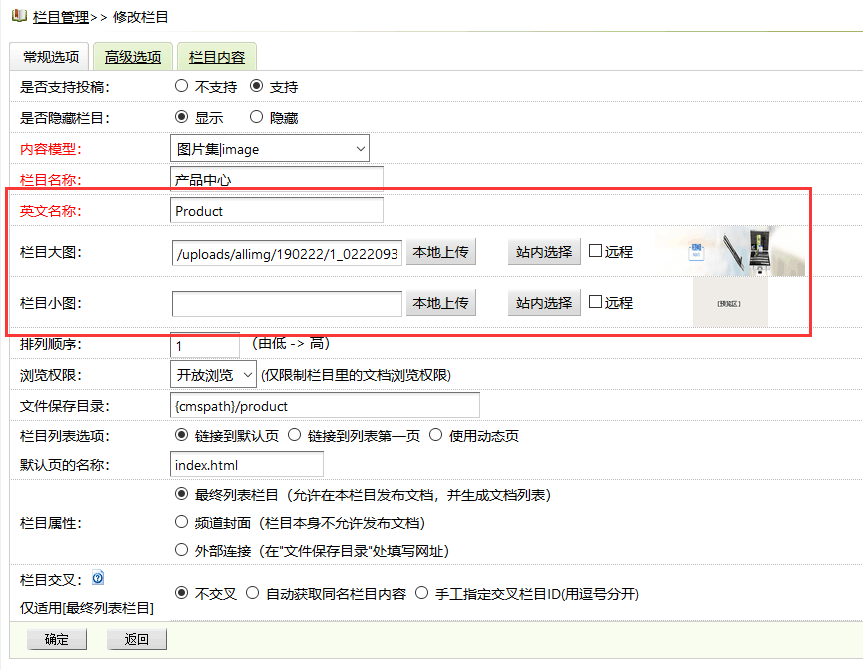
一、添加数据库字段
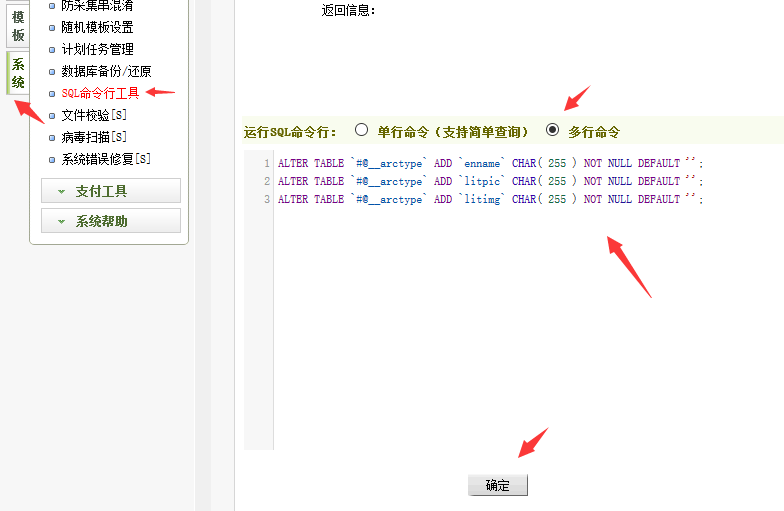
登录织梦后台,进入“系统” -> “SQL命令行工具”,执行以下SQL语句为栏目表添加三个新字段:
ALTER TABLE `dede_arctype` ADD `enname` CHAR( 255 ) NOT NULL DEFAULT '';
ALTER TABLE `dede_arctype` ADD `litpic` CHAR( 255 ) NOT NULL DEFAULT '';
ALTER TABLE `dede_arctype` ADD `litimg` CHAR( 255 ) NOT NULL DEFAULT '';
二、备份核心文件
在进行任何修改前,请务必备份以下7个文件:
/dede/templets/catalog_add.htm
/dede/templets/catalog_edit.htm
/dede/catalog_add.php
/dede/catalog_edit.php
/include/taglib/channel.lib.php
/include/taglib/channelartlist.lib.php
/include/taglib/type.lib.php
三、下载并覆盖修改好的文件
下载已修改好的文件压缩包,根据你的程序编码(GBK或UTF-8)解压后覆盖到网站对应目录。
织梦栏目添加英文名称栏目大图栏目小图功能如果不想直接覆盖文件,或者你的文件已经过二次修改,请参考下文第六、七、八步手动修改。
四、清除浏览器缓存
完成文件覆盖后,务必清除浏览器缓存和临时文件。如果上传图片失败,通常是浏览器缓存引起,可尝试更换浏览器。
五、模板调用写法
在前台模板中,使用以下标签调用新增的栏目字段:
channelartlist标签调用:
{dede:channelartlist row=7 typeid=top}
英文名称:{dede:field.enname/}
栏目大图:{dede:field.litpic/}
栏目小图:{dede:field.litimg/}
{/dede:channelartlist}
channel标签调用:
{dede:channel row=7 type=top}
英文名称:[field:enname/]
栏目大图:[field:litpic/]
栏目小图:[field:litimg/]
{/dede:channel}
type标签调用:
{dede:type typeid=1}
英文名称:[field:enname/]
栏目大图:[field:litpic/]
栏目小图:[field:litimg/]
{/dede:type}
六、模板调用顶级栏目字段
如需在内容页或列表页调用顶级栏目的英文名称、大图、小图,需先添加自定义函数。
参考教程:https://www.cmsroi.com/1597.html
顶级栏目英文名称调用:
{dede:field.typeid function=getToptype(@me,enname)/}
顶级栏目大图调用:
{dede:field.typeid function=getToptype(@me,litpic)/}
顶级栏目小图调用:
{dede:field.typeid function=getToptype(@me,litimg)/}
七、添加后台目录文件
如果选择手动修改,需将以下两个文件添加到后台目录:
/dede/catalog_up.php
/dede/js/catalog.js
八、手动修改代码
以下为手动修改各文件的具体步骤。
8.1、修改 /dede/templets/catalog_add.htm
找到:
onSubmit="return checkSubmit();"
改为:
onSubmit="return checkSubmit();" enctype="multipart/form-data"
找到 name=”typename”,在其下方的</tr>后另起一行插入以下代码:
<script language='javascript' src='js/catalog.js'></script>
<tr>
<td class='bline'  style="padding-left:10px;"> 英文名称: </td>
<td class='bline'>
<input name="enname" id="enname" type="text" size="30" class="iptxt" />
</td>
</tr>
<tr>
<td  colspan="5" class="bline">
<table  border="0" cellspacing="0" cellpadding="0">
<tr>
<td  style="padding-left:10px;"> 栏目大图: </td>
<td >
<table width="100%" border="0" cellspacing="1" cellpadding="1">
<tr>
<td >
<input name="litpic" id="litpic" type="text" style="width:220px;opacity:1;margin-left:0;cursor:auto;" value="" />
<input type="button" value="本地上传" style="width:70px;cursor:pointer;" />
<iframe name='uplitpicfra' id='uplitpicfra' src='' width='200' height='200' style='display:none'></iframe>
<span class="litpic_span"><input name="bigpic" type="file" id="bigpic" onChange="SeePicNew(this, 'divpicview', 'uplitpicfra', 165, 'catalog_add.php','save','bigpic','litpic');" size="1" class='np coolbg' style="cursor:pointer;height:20px;margin-left:-20px;opacity:0;width:85px;" /></span>
<input type="button" name="Submit2" value="站内选择" style="margin-left:8px;" onClick="SelectImageN('form1.litpic','imgstick','picview');" class='np coolbg'/>
<input type='checkbox' class='np' name='ddisremote' value='1'>远程
</td>
</tr>
</table>
</td>
<td  align="center">
<div id='divpicview' class='divpre'><img  src="images/pview.gif"></div>
</td>
</tr>
</table>
</td>
</tr>
<tr>
<td  colspan="5" class="bline">
<table  border="0" cellspacing="0" cellpadding="0">
<tr>
<td  style="padding-left:10px;"> 栏目小图: </td>
<td >
<table width="100%" border="0" cellspacing="1" cellpadding="1">
<tr>
<td >
<input name="litimg" id="litimg" type="text" style="width:220px" value="" />
<input type="button" value="本地上传" style="width:70px;cursor:pointer;" />
<iframe name='upsmallpicfra' id='upsmallpicfra' src='' width='200' height='200' style='display:none'></iframe>
<span class="litpic_span"><input name="smallpic" type="file" id="smallpic" onChange="SeePicNew(this, 'divsmallpicview', 'upsmallpicfra', 165, 'catalog_add.php', 'save', 'smallpic', 'litimg');" size="1" class='np coolbg' style="cursor:pointer;height:20px;margin-left:-20px;opacity:0;width:85px;"/></span>
<input type="button" name="Submit2" value="站内选择" style="margin-left:8px;" onClick="SelectImageN('form1.litimg','imgstick','smallpicview');" class='np coolbg'/>
<input type='checkbox' class='np' name='ddisremote2' value='1'>远程
</td>
</tr>
</table>
</td>
<td  align="center">
<div id='divsmallpicview' class='divpre'><img  src="images/pview.gif"></div>
</td>
</tr>
</table>
</td>
</tr>
8.2、修改 /dede/templets/catalog_edit.htm
找到:
onSubmit="return checkSubmit();"
改为:
onSubmit="return checkSubmit();" enctype="multipart/form-data"
找到 name=”typename”,在其下方的</tr>后另起一行插入以下代码:
<script language='javascript' src='js/catalog.js'></script>
<tr>
<td class='bline'  style="padding-left:10px;"> 英文名称: </td>
<td class='bline'>
<input name="enname" id="enname" type="text" size="30" class="iptxt" value="<?php echo $myrow['enname']?>" />
</td>
</tr>
<tr>
<td  colspan="5" class="bline">
<table  border="0" cellspacing="0" cellpadding="0">
<tr>
<td  style="padding-left:10px;"> 栏目大图: </td>
<td >
<table width="100%" border="0" cellspacing="1" cellpadding="1">
<tr>
<td >
<input name="litpic" id="litpic" type="text" style="width:220px;opacity:1;margin-left:0;cursor:auto;" value="<?php echo $myrow['litpic']?>" />
<input type="button" value="本地上传" style="width:70px;cursor:pointer;" />
<iframe name='uplitpicfra' id='uplitpicfra' src='' width='200' height='200' style='display:none'></iframe>
<span class="litpic_span"><input name="bigpic" type="file" id="bigpic" onChange="SeePicNew(this, 'divpicview', 'uplitpicfra', 165, 'catalog_edit.php','save','bigpic','litpic');" size="1" class='np coolbg' style="cursor:pointer;height:20px;margin-left:-20px;opacity:0;width:85px;" /></span>
<input type="button" name="Submit2" value="站内选择" style="margin-left:8px;" onClick="SelectImageN('form1.litpic','imgstick','picview');" class='np coolbg'/>
<input type='checkbox' class='np' name='ddisremote' value='1'>远程
</td>
</tr>
</table>
</td>
<td  align="center">
<div id='divpicview' class='divpre'><img  src="<?php if($myrow['litpic']!="") echo $myrow['litpic']; else echo "images/pview.gif";?>"></div>
</td>
</tr>
</table>
</td>
</tr>
<tr>
<td  colspan="5" class="bline">
<table  border="0" cellspacing="0" cellpadding="0">
<tr>
<td  style="padding-left:10px;"> 栏目小图: </td>
<td >
<table width="100%" border="0" cellspacing="1" cellpadding="1">
<tr>
<td >
<input name="litimg" id="litimg" type="text" style="width:220px" value="<?php echo $myrow['litimg']?>" />
<input type="button" value="本地上传" style="width:70px;cursor:pointer;" />
<iframe name='upsmallpicfra' id='upsmallpicfra' src='' width='200' height='200' style='display:none'></iframe>
<span class="litpic_span"><input name="smallpic" type="file" id="smallpic" onChange="SeePicNew(this, 'divsmallpicview', 'upsmallpicfra', 165, 'catalog_edit.php', 'save', 'smallpic', 'litimg');" size="1" class='np coolbg' style="cursor:pointer;height:20px;margin-left:-20px;opacity:0;width:85px;"/></span>
<input type="button" name="Submit2" value="站内选择" style="margin-left:8px;" onClick="SelectImageN('form1.litimg','imgstick','smallpicview');" class='np coolbg'/>
<input type='checkbox' class='np' name='ddisremote2' value='1'>远程
</td>
</tr>
</table>
</td>
<td  align="center">
<div id='divsmallpicview' class='divpre'><img  src="<?php if($myrow['litimg']!="") echo $myrow['litimg']; else echo "images/pview.gif";?>"></div>
</td>
</tr>
</table>
</td>
</tr>
8.3、修改 /dede/catalog_add.php
找到大约239行的 UpDateCatCache();,在其上方加入以下代码:
//添加英文名称栏目大图栏目小图
require_once(DEDEADMIN.'/inc/inc_archives_functions.php');
if(!empty($ddisremote))
{
$litpic = UploadOneImage('imgfile', $litpic, $ddisremote, 1);
}
if(!empty($ddisremote2))
{
$litimg = UploadOneImage('imgfile', $litimg, $ddisremote2, 1);
}
$id = $dsql->GetLastID();
$upquery = "UPDATE `dede_arctype` SET `enname`='$enname',`litpic`='$litpic',`litimg`='$litimg' WHERE id='$id' ";
$dsql->ExecuteNoneQuery($upquery);
//添加英文名称栏目大图栏目小图
8.4、修改 /dede/catalog_edit.php
找到大约106行的 UpDateCatCache();,在其上方加入以下代码:
//添加英文名称栏目大图栏目小图
require_once(DEDEADMIN.'/inc/inc_archives_functions.php');
if(!empty($ddisremote))
{
$litpic = UploadOneImage('imgfile', $litpic, $ddisremote, 1);
}
if(!empty($ddisremote2))
{
$litimg = UploadOneImage('imgfile', $litimg, $ddisremote2, 1);
}
$upquery = "UPDATE `dede_arctype` SET `enname`='$enname',`litpic`='$litpic',`litimg`='$litimg' WHERE id='$id' ";
$dsql->ExecuteNoneQuery($upquery);
//添加英文名称栏目大图栏目小图
九、标签库输出修改
9.1、修改 /include/taglib/channel.lib.php
找到以下字段代码(共4处):
id,typename,typedir,isdefault,ispart,defaultname,namerule2,moresite,siteurl,sitepath
全部改为:
*
9.2、修改 /include/taglib/channelartlist.lib.php
找到以下字段代码:
id,typename,typedir,isdefault,ispart,defaultname,namerule2,moresite,siteurl,sitepath
改为:
*
9.3、修改 /include/taglib/type.lib.php
找到以下字段代码:
id,typename,typedir,isdefault,ispart,defaultname,namerule2,moresite,siteurl,sitepath
改为:
*
完成以上所有步骤后,织梦DedeCMS栏目即可正常使用英文名称、栏目大图、栏目小图功能。