
织梦DedeCMS TAG标签页伪静态设置教程(单链接名称版)
无论网站全站是静态、动态还是伪静态,均可通过本教程将TAG标签页设置为伪静态,并实现单链接名称形式。
电脑站TAG标签伪静态实现效果
按本教程操作后,电脑站TAG标签URL将呈现如下格式:
TAG标签首页:http://www.cmsroi.com/tags.html
TAG标签列表:http://www.cmsroi.com/tags/织梦.html
TAG标签分页:http://www.cmsroi.com/tags/织梦_2.html
手机站TAG标签伪静态实现效果
按本教程操作后,手机站TAG标签URL将呈现如下格式:
TAG标签首页:http://m.cmsroi.com/tags.html
TAG标签列表:http://m.cmsroi.com/tags/织梦.html
TAG标签分页:http://m.cmsroi.com/tags/织梦_2.html
电脑站TAG伪静态实现教程
1、打开 /tags.php 文件,找到第18行:
if(isset($tags[2])) $PageNo = intval($tags[2]);
在该行下面加入:
define('DEDERETAG', 'Y');
2、打开 /include/taglib/tag.lib.php 文件,找到第87行:
$row['link'] = $cfg_cmsurl."/tags.php?/".urlencode($row['keyword'])."/";
将其修改为:
$row['link'] = $cfg_cmsurl."/tags/".urlencode($row['keyword']).".html";
3、打开 /include/arc.taglist.class.php 文件,找到第458行:
$purl .= "?/".urlencode($this->Tag);
将其修改为:
if(!defined('DEDERETAG'))
{
    $purl .= "?/".urlencode($this->Tag);
}
else
{
$purl = $GLOBALS['cfg_cmsurl']."/tags/".urlencode($this->Tag).".html";
}
继续找到:
return $plist;
在该行上面加入:
if(defined('DEDERETAG'))
{
$plist = preg_replace('/_(\d+).html/i','.html',$plist);
$plist = preg_replace('/.html\/(\d+)\//i','_\\1.html',$plist);
}
4、电脑站TAG标签伪静态规则,根据网站主机环境选择对应规则。
.htaccess (Apache):
RewriteEngine On
RewriteBase /
RewriteRule ^tags\.html$ tags\.php
RewriteRule ^tags/(.*)_([0-9]+)\.html$ tags\.php\?\/$1\/$2
RewriteRule ^tags/(.*)_([0-9]+)\.html$ tags\.php\?\/$1\/$2\/
RewriteRule ^tags/(.*)\.html$ tags\.php\?\/$1 [L]
RewriteRule ^tags/(.*)\.html$ tags\.php\?\/$1\/
Nginx:
rewrite "^/tags\.html$" /tags.php;
rewrite "^/tags/(.*)_([0-9]+)\.html$" /tags.php?/$1/$2/ last;
rewrite "^/tags/(.*)\.html$" /tags.php?/$1/;
web.config (iis7 iis8):
<rule name="tag首页">
<match url="^tags.html$" ignoreCase="false" />
<action type="Rewrite" url="tags.php" appendQueryString="false" />
</rule>
<rule name="tag列表分页">
<match url="^tags/(.*)_([0-9]+).html$" ignoreCase="false" />
<action type="Rewrite" url="/tags.php?/{R:1}/{R:2}" appendQueryString="false" />
</rule>
<rule name="tag列表分页最后有左斜杠">
<match url="^tags/(.*)_([0-9]+).html$" ignoreCase="false" />
<action type="Rewrite" url="/tags.php?/{R:1}/{R:2}/" appendQueryString="false" />
</rule>
<rule name="tag列表">
<match url="^tags/(.*).html$" ignoreCase="false" />
<action type="Rewrite" url="/tags.php?/{R:1}" appendQueryString="false" />
</rule>
<rule name="tag列表最后有左斜杠">
<match url="^tags/(.*).html$" ignoreCase="false" />
<action type="Rewrite" url="/tags.php?/{R:1}/" appendQueryString="false" />
</rule>
如需后台TAG标签管理里的TAG链接点击打开也是伪静态,可进行如下修改。
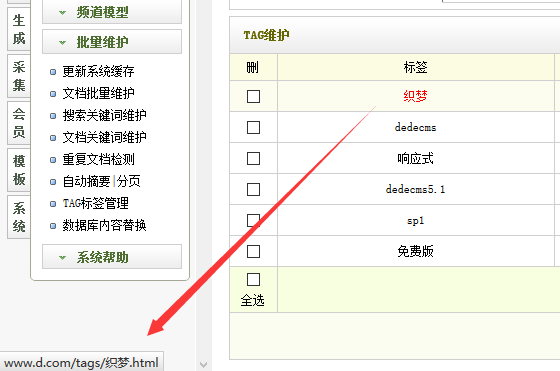
打开 /dede/templets/tags_main.htm 文件,找到第89行:
<a href="../tags.php?/<?php echo urlencode($fields['tag']); ?>/" target="_blank">{dede:field.tag /}</a>
将其修改为:
<a href="../tags/<?php echo urlencode($fields['tag']); ?>.html" target="_blank">{dede:field.tag /}</a>
手机站TAG伪静态实现教程
1、在m文件夹中添加tags.php文件供手机站使用。
织梦手机站TAG标签伪静态-单链接名称版2、手机站TAG标签伪静态规则,根据网站主机环境选择对应规则。
.htaccess (Apache,放到m文件夹下):
RewriteEngine On
RewriteBase /
RewriteRule ^tags\.html$ tags\.php
RewriteRule ^tags/(.*)_([0-9]+)\.html$ tags\.php\?\/$1\/$2
RewriteRule ^tags/(.*)_([0-9]+)\.html$ tags\.php\?\/$1\/$2\/
RewriteRule ^tags/(.*)\.html$ tags\.php\?\/$1 [L]
RewriteRule ^tags/(.*)\.html$ tags\.php\?\/$1\/
Nginx:
rewrite "^/tags\.html$" /tags.php;
rewrite "^/tags/(.*)_([0-9]+)\.html$" /tags.php?/$1/$2/ last;
rewrite "^/tags/(.*)\.html$" /tags.php?/$1/;
web.config (iis7 iis8):
<rule name="tag首页">
<match url="^tags.html$" ignoreCase="false" />
<action type="Rewrite" url="tags.php" appendQueryString="false" />
</rule>
<rule name="tag列表分页">
<match url="^tags/(.*)_([0-9]+).html$" ignoreCase="false" />
<action type="Rewrite" url="/tags.php?/{R:1}/{R:2}" appendQueryString="false" />
</rule>
<rule name="tag列表分页最后有左斜杠">
<match url="^tags/(.*)_([0-9]+).html$" ignoreCase="false" />
<action type="Rewrite" url="/tags.php?/{R:1}/{R:2}/" appendQueryString="false" />
</rule>
<rule name="tag列表">
<match url="^tags/(.*).html$" ignoreCase="false" />
<action type="Rewrite" url="/tags.php?/{R:1}" appendQueryString="false" />
</rule>
<rule name="tag列表最后有左斜杠">
<match url="^tags/(.*).html$" ignoreCase="false" />
<action type="Rewrite" url="/tags.php?/{R:1}/" appendQueryString="false" />
</rule>
3、手机站TAG标签首页和TAG标签列表页模板为:tag_m.htm、taglist_m.htm。
4、TAG标签调用方法与电脑站一致。